
5 Best Alternative Browsers to Try If You're Tired of Chrome
We may have been using Chrome for years, but that doesn't mean it's the only browser out there. Check out these alternative browsers and leverage their features to turbo-boost your productivity. Last…
We may have been using Chrome for years, but that doesn't mean it's the only browser out there. Check out these alternative browsers and leverage their features to turbo-boost your productivity.
Last we checked, we still use Google Chrome to browse the internet. So do many people we know. They mostly use Chrome, Safari, or Firefox. In fact, Chrome still runs on roughly seven of every ten browsers worldwide, but is it the best one you can use?
Global browser market share
Disclaimer: This is a non-sponsored, non-affiliate article.
Is Chrome still the best browser?
It's hard to pinpoint the "best" web browser, as it relies heavily on your working needs, style, and preferences. However, we've noticed more and more new browsers being released into the market. And we say these alternative browsers may be worth trying if you:
- Don't want to deal with Chrome's tracking and privacy concerns
- Need certain features to support your productivity
The best browser isn't the most popular one. It's the one that fits how you actually work.
5 alternative browsers to try this year
Of all the alternatives to Chrome we've seen and tried, the following five alternative browsers are the ones that intrigue us the most. Let's see what makes each one special, what features they offer, and if any of them might be a good addition to your computer.
Arc
If you need extra "force" to keep your tabs organized, Arc could be the best web browser for you. You can rename, group, and ungroup your tabs into different Spaces based on your needs.
Arc also offers almost limitless customization, which may be the reason why some people say it's best for digital designers and web developers. Other popular features include:
- Pin tabs. Unpinned tabs are automatically closed after 12 hours (or 30 days tops). This way, you don't get distracted by too many open yet idle tabs.
- Tabs organization. Pinned tabs and today's tabs are displayed separately so you know which ones you're actively using.
- Easel and note. These two tools help you screenshot, add images, write notes, and share all your doodles with other Arc users.
Since this article was first published, Arc has changed a lot. It added a Windows app alongside macOS and dropped its invite-only signup, so anyone can download it. In 2025, The Browser Company paused active development of Arc to focus on a new AI browser called Dia, so Arc now receives maintenance and security updates rather than new features.
Sidekick
A distraction-free browser made for productivity, and loved by the ADHD community. Sidekick comes with winning features such as:
- Single-task focus mode. It keeps you from getting distracted by jumping from one project to another.
- No-ads plan. Subscription-based plans allow you to browse with no intrusive ads whatsoever, so your attention doesn't waver.
- Distraction blocker. When turned on, it keeps you from opening unrelated sites like YouTube or social media.
Ferdium
Ferdium is one of the alternative browsers that allows you to have all the apps and services you use in one place. You can even add custom services, too.
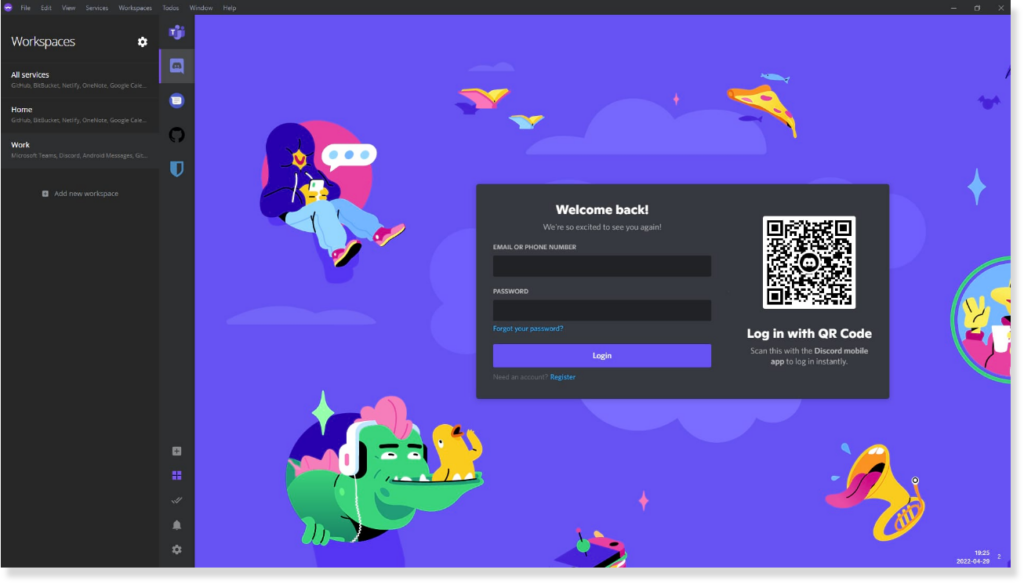
But don't be overwhelmed, the browser has the option to separate your work and personal uses. It also comes with other tools such as:
- Workspaces and to-do. They keep your attention focused on the task at hand, without moving too much between apps.
- No login access. You can use Ferdium without an account, great for those who have concerns regarding privacy issues.
- Resources saving. Idle apps are sent to sleep so they don't slow down your computer.
Brave
Brave might be one of the best alternatives to Chrome if you value online privacy and data safety. This browser claims to have better protection than Google and other big names.
Features they offer include:
- Ads, cross-site tracker, and third-party cookie blocker. The browser keeps ads from following you from site to site. This also means you get better speed and battery life!
- Built-in apps. Brave comes with free video calls, offline playlists, and a customizable newsfeed.
- Crypto rewards. You can get rewards through an in-browser crypto wallet on the advanced plan.
Vivaldi
Created by the people behind the legendary Opera, Vivaldi offers something different. This browser is made for multitaskers.
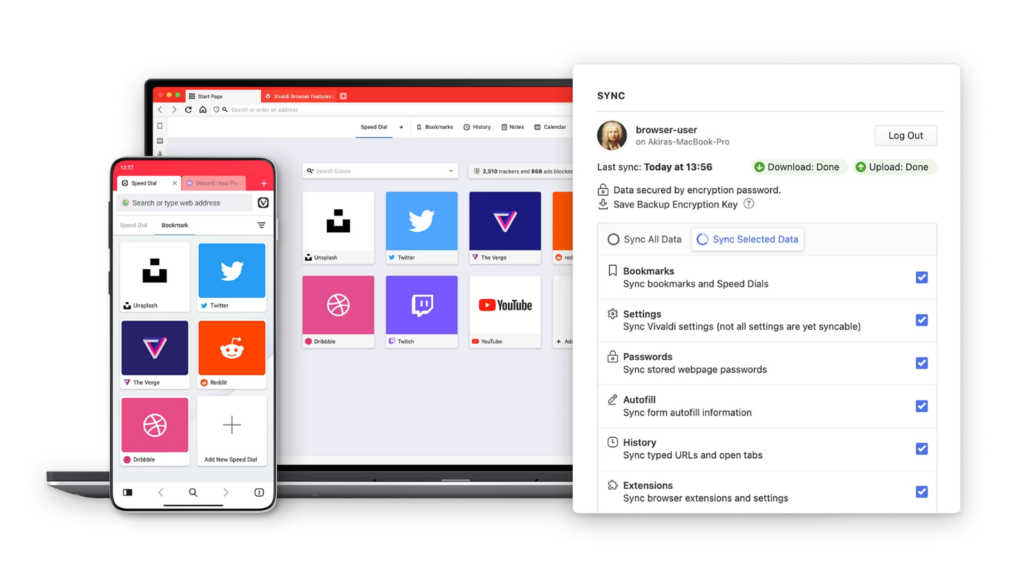
Vivaldi offers flexibility and comes with as many customizations as you like:
- UI customization. Change colors, wallpapers, and more, and share your theme with the community.
- Toolbar editor. Play with various tools and tweaks to make your browsing experience easier.
- Built-in apps. Calendar, translator, note taker, ads blocker, and more.
How to do it
- List the 3 to 5 sites you live in every day and the one habit that most breaks your focus.
- Shortlist two browsers that map to that need: workspace and tab tools (Vivaldi, Arc) or privacy blocking (Brave).
- Import your Chrome bookmarks and extensions (all of these are Chromium-based) and run each pick as your default for a week.
- Compare their tracker and fingerprint protection on PrivacyTests.org before you commit.
See a worked example
As an example, say a small-agency owner lives in Gmail, Notion, and Slack all day and keeps losing focus to Twitter and YouTube. They might pin those three work tabs into one workspace in a tab-organizing browser, turn on a built-in tracker blocker, and push social sites into a separate profile, so the work tabs stay put while the distractions live somewhere else. The point is to match one browser's real strength to how you already work, not to chase the longest feature list.
Tools to use
PrivacyTests.org for independent tracker and fingerprint-protection results, the Wikipedia usage-share table for current market-share figures, and Brave as the privacy-first Chromium download.
Steal our AI prompt
Act as a neutral browser-selection advisor. Here is how I actually work: [describe your typical day, the 3 to 5 sites or apps you keep open, your device and OS, and your single biggest frustration with Chrome]. Here are the browsers I am considering: [paste names, e.g. Arc, Vivaldi, Brave, Ferdium, Sidekick]. For each one, list the two features that best fit my workflow, the one meaningful drawback, and who it is not a good fit for. Then recommend one primary pick and one backup, and give me a one-week trial plan (what to import, what to measure, when to switch back). Do not oversell, and flag anything you are unsure about.
What is the best web browser for you?
So many alternatives to Chrome, right? Even better, these alternative browsers are Chromium-based, which means you can easily export your favorite extensions and bookmarks!
We recommend using alternative browsers that provide focus mode and tabs management if you're a business owner, so you can really get the work done effectively. Meanwhile, designers and developers might benefit more from customized features.
But no matter what alternative browsers you end up using, make sure you choose ones that offer powerful online protection and privacy.
Keep reading
 UX & Web Design
Dynamic Website Explained: 3 Ways to Make Your Site Dynamic
You might have often heard that a dynamic website can benefit your business and your users. But what does it actually entail? What makes a site dynamic and how does it help bring you more…
- UX & Web Design
The Checkout Is Where Your Ecommerce Revenue Leaks Out
Seven in ten carts never convert, and most of that loss is self-inflicted at checkout. Here is what the data says is leaking, and the fixes that earn the order back.
- UX & Web Design
Site Speed Is a Revenue Lever, Not a Tech Detail
Performance gets filed under engineering housekeeping. The data says a faster site is one of the most direct levers on conversion and revenue you have. Here is the business case.
See exactly where your site is losing conversions
Paste your URL and get an instant conversion score. No form to fill out, no sales call.
Weekly strategies for businesses building what's next.
The Next Draft: one email a week on turning B2B websites into pipeline. No fluff, unsubscribe anytime.