
5 Things We Wish Everyone Knew About Social Video Marketing Strategy
We are compiling 5 key tips for a successful social video marketing strategy, taken from our past discussion with Social Snacks Videos. YouTube, TikTok, Instagram… Leading social media platforms that…
We are compiling 5 key tips for a successful social video marketing strategy, taken from our past discussion with Social Snacks Videos.
YouTube, TikTok, Instagram…
Leading social media platforms that we use daily have shifted our media consumption from texts and images to videos. So, what does your brand need to do to keep up with the trend and maintain engagement with your audience?
We say, learn social video marketing strategy and join the club!
One shoot should leave you with a library, not a single film.
5 Tips to Create a Successful Social Video Marketing Strategy
Before you board the video production ship, we have discussed this with Tracy Hatfield, CEO of Social Snacks Video, a Chicago-based social video marketing production house. As an expert in her field, Tracy has shared the five important things you need to know about social video marketing strategy.
Bulk is better
Never let producing for one campaign be a reason to create just one video. You can always find different angles to create multiple stories even from one campaign. Here are some ideas off the top of our heads:
Short interviews
Conduct interviews with your talent, crew, and staff. This type of video shows the human side of your brand and your campaign, which is essential if you want to build a real, genuine connection with your audience.
Behind the scenes
Show all the laughs, food, and challenges behind the camera. Again, this also humanizes your brand, so don’t let anything go off the record 😆
Alternate opening or alternate ending
It’s always good to have a plan B. You can also use the alternate videos for A/B testing with your ads.
How to do it
- List every angle you want before the shoot day, not after.
- Build a shot list that groups setups so you capture bulk assets in one lighting or location block.
- Reserve 20 to 30 minutes at the end of the day for interviews and behind-the-scenes.
- Log each planned asset in a content calendar so nothing gets lost in the edit.
See a worked example
Say you book a half-day shoot for one product launch. As an example, before you wrap you could also capture a two-minute founder interview, a phone-shot behind-the-scenes reel, and an alternate ending for A/B testing. That is potentially four or five distinct assets from a single crew call instead of one hero film.
Tools to use
StudioBinder for shot lists and call sheets so one shoot covers several setups, and Notion for a content calendar to track the batch.
Steal our AI prompt
I'm planning a single video shoot for [describe the campaign or product]. Details: [paste brief, talent, location, budget]. List 5 distinct video assets I could capture in this one shoot day (for example a hero film, a short interview, a behind-the-scenes clip, and an alternate ending), and for each one give me the extra shots or setups to add to my shot list.
Be purpose-driven
Social video marketing can be more than just a pretty film for YouTube or Instagram. In line with the previous point, here are several different ways you can use your videos:
- Explain your campaign process. Show your brainstorming sessions, all the meetings, and other things that took place before the director says, “Action!”
- Answer commonly asked questions, such as: Who should watch this video? What’s the most exciting part about this project? What’s the purpose of having this campaign?
- Show gratitude to your loyal audience. This is especially true for established brands. Remember that your brand wouldn’t be here without them. As for new brands, you can say thanks to your team members, crew, and everyone else involved in the journey so far.
How to do it
- Write a one-line purpose for each video before you edit it (awareness, objection-handling, gratitude).
- Map each purpose to the platform and funnel stage where it belongs.
- Cut anything that has no clear job rather than posting it to fill a slot.
- Track purpose as a column so you can spot gaps, like having no bottom-funnel videos.
See a worked example
Before you post, you could map each cut to one job. As an example, the hero film introduces the campaign on YouTube, the interview answers your top three sales objections, and the behind-the-scenes clip thanks your community on Stories. When every video has a stated purpose, you tend to make fewer that quietly do nothing.
Tools to use
Steal our AI prompt
Here is a list of video assets from one campaign: [paste list]. For each one, suggest a single clear purpose (awareness, objection-handling, community or gratitude, or conversion), the funnel stage it fits, and the best platform to post it. Flag any funnel stage I have no video for.
Think first impression
When you meet someone new, you observe their voice, appearance, face, and micro-expressions. These set expectations in your unconscious mind, whether or not you think you would click with that person.
Now treat your videos as a new person you’d like your audience to meet.
How to do it
- Open on the payoff, a question, or motion, not a logo or slow intro.
- Add a caption or hook in the first frame so muted viewers still get the point.
- Design a clear, readable thumbnail that matches the hook.
- Check the audience-retention graph and re-cut openings that drop viewers early.
See a worked example
Treat the first two or three seconds like a first handshake. As an example, a video that opens on a title card and a slow logo animation may lose people before the point lands, while one that opens on the payoff or a spoken question tends to hold attention longer. Try filming two openings and letting your retention data pick the winner.
Tools to use
CapCut to add captions and hook text over the opening seconds, and the Canva YouTube Thumbnail Maker for a readable thumbnail.
Steal our AI prompt
Here is the transcript or description of my video: [paste]. Write 5 opening hooks (each under 2 seconds of spoken or on-screen text) that would make someone stop scrolling, plus 3 thumbnail text ideas of 3 to 5 words each that match those hooks.
Be flexible
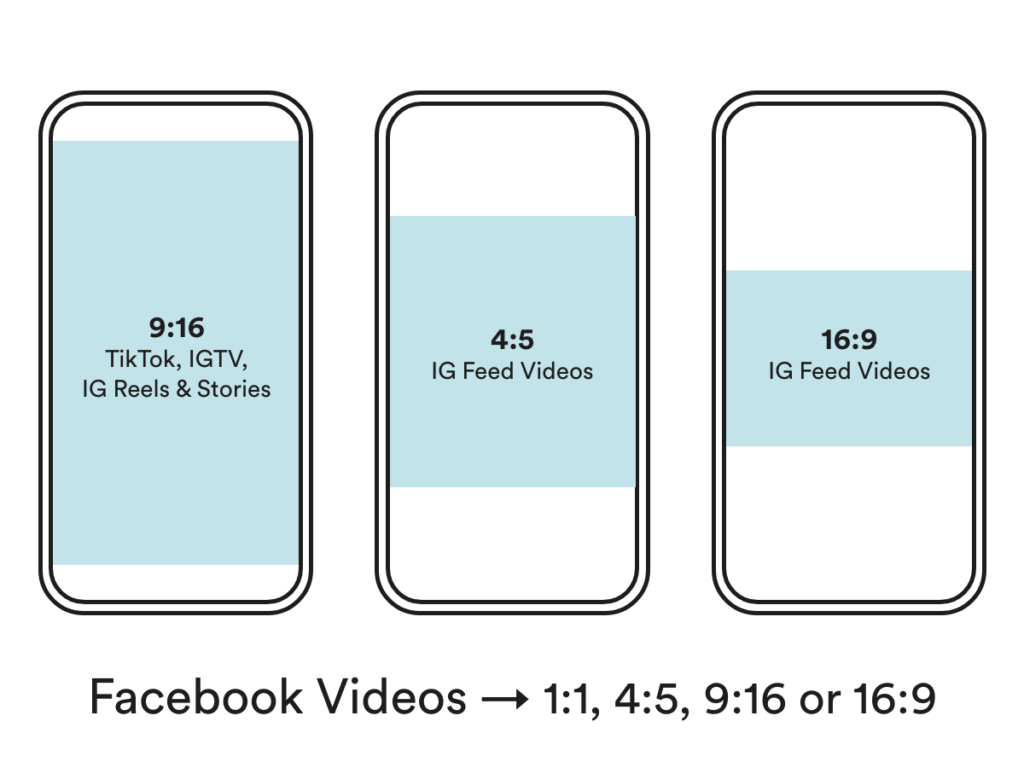
Different platforms require different ratios, so you need to adjust your videos accordingly. Check out the image below to find the recommended size ratio for widely-used platforms.
How to do it
- Default to shooting 9:16 vertical, since it covers most short-form feeds.
- Keep key action and captions inside a center-safe zone so no crop cuts them off.
- Export a 16:9 version for YouTube and a 4:5 version for feed placements.
- Check current per-platform specs before exporting, since they change.
See a worked example
The same 60-second clip rarely fits every feed. As an example, a 9:16 vertical cut sits full-screen on TikTok, Reels, and Shorts, while YouTube still favors 16:9 and a Facebook feed post often performs better at 4:5. Reframing per platform, rather than posting one letterboxed version everywhere, tends to use more of the screen.
Tools to use
Kapwing to reframe one video into multiple aspect ratios, and the Sprout Social video specs guide for current per-platform dimensions.
Steal our AI prompt
I have one video edited at [describe current ratio, e.g. 16:9 at 1920x1080]. I want to post it on [list platforms, e.g. TikTok, Instagram Reels, YouTube, Facebook feed]. For each platform, tell me the recommended aspect ratio and resolution, and what to watch for when reframing so captions and key action are not cropped.
Split the baby
Different platforms also perform best with different video durations. Split your videos and utilize them on all your channels. Here are some common best practices for distributing social video marketing.
- Full video on YouTube
- Shorter video for ads
- Snippets on IG Stories
- Create GIFs for newsletters
- Recreate the transcript into a blog post
And many more. The sky is the limit!
How to do it
- Publish the full-length cut on YouTube as the anchor.
- Auto-clip the best moments into vertical shorts for TikTok, Reels, and Shorts.
- Pull the transcript and reshape it into a blog post or newsletter section.
- Export a short loop as a GIF for email and social.
See a worked example
One 10-minute interview can become far more than a single upload. As an example, you might keep the full cut on YouTube, pull three 30-second clips for Reels and Shorts, turn a punchy moment into a GIF for your newsletter, and paste the cleaned transcript into a blog post. That is potentially six or more assets from one recording.
Tools to use
Steal our AI prompt
Here is the transcript of my [describe length] video: [paste transcript]. Break it into: (1) the 3 strongest 30-second clips with timestamps for short-form, (2) a 600-word blog post based on the content, and (3) one 5-second moment that would work as a looping GIF for a newsletter.
There you have it! The five things about the social video marketing strategy that we wish every single one of you knew.
If you want to incorporate social videos into your website and digital marketing strategy, check out our Chicago-based partner, Social Snacks Videos!
Keep reading
 Branding & Digital Marketing
Can Social Media Make You Money? 5 Social Media Branding Myths to Debunk
Have you ever invested in social media branding, content, and marketing only to find your efforts falling short of driving sales? Despite gaining followers, likes, and interactions, the financial…
- Branding & Digital Marketing
Thought Leadership Is a B2B Growth Channel, Not a Vanity Project
Most B2B content is a sales deck in disguise or filler nobody finishes. The data on what real thought leadership does to buying decisions is strong enough to change how you budget for it.
 Branding & Digital Marketing
Unraveling 5 Secrets of Consumer Buying Decision Process
Does your business face the challenge of capturing the attention and loyalty of consumers? Understanding the intricacies of the consumer buying decision process is crucial for creating effective…
See exactly where your site is losing conversions
Paste your URL and get an instant conversion score. No form to fill out, no sales call.
Weekly strategies for businesses building what's next.
The Next Draft: one email a week on turning B2B websites into pipeline. No fluff, unsubscribe anytime.